Cython 基本性质可以总结如下:Cython 是采用 C 数据类型的 Python。
Cython 是 Python:几乎任何 Python 代码段也是有效 Cython 代码。(有一些 局限性 ,但这种近似现在还适用。) Cython 编译器会把它转换为 C 代码,使能够等效调用 Python/C API。
但 Cython 不仅如此,由于可以把参数和变量声明成拥有 C 数据类型。可以自由混合操纵 Python 值和 C 值的代码,在可能的任何地方自动发生转换。Python 操作引用计数的维护和错误校验也是自动的,且 Python 异常处理设施的全部功能 (包括 try-except 和 try-finally 语句) 都是可用的 – 即使在 C 数据操纵过程中。
由于 Cython 可以接受几乎任何有效 python 源文件,因此,入门时最困难的事情之一就是弄明白如何编译扩展。
所以,让我们从典型 Python Hello World 开始:
print("Hello World")
保存此代码在文件名为
helloworld.pyx
。现在我们需要创建
setup.py
,就像 Python Makefile (更多信息见
源文件和编译
)。您的
setup.py
应该看起来像:
from distutils.core import setup
from Cython.Build import cythonize
setup(
    ext_modules = cythonize("helloworld.pyx")
)
要使用此构建 Cython 文件,使用命令行选项:
$ python setup.py build_ext --inplace
将在本地目录中留下一个文件称为
helloworld.so
在 Unix 或
helloworld.pyd
在 Windows。现在要使用此文件:启动 Python 解释器并像常规 Python 模块一样将其简单导入:
>>> import helloworld
Hello World
恭喜!现在知道如何构建 Cython 扩展了。但到目前为止,此范例并没有让人真正感觉为什么想要使用 Cython,所以,让我们创建一个更现实的范例。
pyximport
:针对开发者的 Cython 编译

若您的模块不要求任何额外 C 库或特殊构建设置,则可以使用最初由 Paul Prescod 开发的 pyximport 模块在导入时直接加载 .pyx 文件,而无需运行
setup.py
文件每次改变代码时。它随 Cython 一起提供并安装,且可以像这样使用:
>>> import pyximport; pyximport.install()
>>> import helloworld
Hello World
Pyximport 模块还为正常 Python 模块提供实验性编译支持。这允许当 Python 导入每个 .pyx 和 .py 模块 (包括标准库和已安装包) 时自动运行 Cython。由于 Cython 仍无法编译许多 Python 模块,在这种情况下,导入机制将回退到代之以加载 Python 源模块。.py 导入机制是像这样安装的:
>>> pyximport.install(pyimport=True)
注意:不推荐让 Pyximport 在最终用户侧构建代码,因为它会挂钩到他们的导入系统。迎合最终用户的最佳方式是提供预构建的二进制包以 wheel 打包格式。
来自官方 Python 教程的简单 Fibonacci (斐波那契) 函数定义如下 :
from __future__ import print_function
def fib(n):
    """Print the Fibonacci series up to n."""
    a, b = 0, 1
    while b < n:
        print(b, end=' ')
        a, b = b, a + b
    print()
现在遵循 Hello World 示例步骤,我们首先把文件重命名为拥有
.pyx
扩展名,允许叫
fib.pyx
,然后我们创建
setup.py
文件。使用为 Hello World 范例创建的文件,所有需要更改的是 Cython 文件名的名称和结果模块名,这样我们就有:
from distutils.core import setup
from Cython.Build import cythonize
setup(
    ext_modules=cythonize("fib.pyx"),
)
采用 helloworld.pyx 使用的相同命令构建扩展:
$ python setup.py build_ext --inplace
和使用新的扩展采用:
>>> import fib
>>> fib.fib(2000)
1 1 2 3 5 8 13 21 34 55 89 144 233 377 610 987 1597
Here’s a small example showing some of what can be done. It’s a routine for finding prime numbers. You tell it how many primes you want, and it returns them as a Python list.
primes.pyx
:
def primes(int nb_primes): cdef int n, i, len_p cdef int p[1000] if nb_primes > 1000: nb_primes = 1000 len_p = 0 # The current number of elements in p. n = 2 while len_p < nb_primes: # Is n prime? for i in p[:len_p]: if n % i == 0: break # If no break occurred in the loop, we have a prime. else: p[len_p] = n len_p += 1 n += 1 # Let's return the result in a python list: result_as_list = [prime for prime in p[:len_p]] return result_as_list |
You’ll see that it starts out just like a normal Python function definition, except that the parameter
nb_primes
is declared to be of type
int
. This means that the object passed will be converted to a C integer (or a
TypeError.
will be raised if it can’t be).
Now, let’s dig into the core of the function:
cdef int n, i, len_p
cdef int p[1000]
Lines 2 and 3 use the
cdef
statement to define some local C variables. The result is stored in the C array
p
during processing, and will be copied into a Python list at the end (line 22).
注意
You cannot create very large arrays in this manner, because they are allocated on the C function call stack, which is a rather precious and scarce resource. To request larger arrays, or even arrays with a length only known at runtime, you can learn how to make efficient use of C 内存分配 , Python 数组 or NumPy 数组 采用 Cython。
if nb_primes > 1000:
    nb_primes = 1000
As in C, declaring a static array requires knowing the size at compile time. We make sure the user doesn’t set a value above 1000 (or we would have a segmentation fault, just like in C).
len_p = 0  # The number of elements in p
n = 2
while len_p < nb_primes:
Lines 7-9 set up for a loop which will test candidate numbers for primeness until the required number of primes has been found.
# Is n prime?
for i in p[:len_p]:
    if n % i == 0:
        break
Lines 11-12, which try dividing a candidate by all the primes found so far, are of particular interest. Because no Python objects are referred to, the loop is translated entirely into C code, and thus runs very fast. You will notice the way we iterate over the
p
C array.
for i in p[:len_p]:
The loop gets translated into a fast C loop and works just like iterating over a Python list or NumPy array. If you don’t slice the C array with
[:len_p]
, then Cython will loop over the 1000 elements of the array.
# If no break occurred in the loop
else:
    p[len_p] = n
    len_p += 1
n += 1
If no breaks occurred, it means that we found a prime, and the block of code after the
else
line 16 will be executed. We add the prime found to
p
. If you find having an
else
after a for-loop strange, just know that it’s a lesser known features of the Python language, and that Cython executes it at C speed for you. If the for-else syntax confuses you, see this excellent
blog post
.
# Let's put the result in a python list:
result_as_list  = [prime for prime in p[:len_p]]
return result_as_list
In line 22, before returning the result, we need to copy our C array into a Python list, because Python can’t read C arrays. Cython can automatically convert many C types from and to Python types, as described in the documentation on
类型转换
, so we can use a simple list comprehension here to copy the C
int
values into a Python list of Python
int
objects, which Cython creates automatically along the way. You could also have iterated manually over the C array and used
result_as_list.append(prime)
, the result would have been the same.
You’ll notice we declare a Python list exactly the same way it would be in Python. Because the variable
result_as_list
hasn’t been explicitly declared with a type, it is assumed to hold a Python object, and from the assignment, Cython also knows that the exact type is a Python list.
Finally, at line 18, a normal Python return statement returns the result list.
Compiling primes.pyx with the Cython compiler produces an extension module which we can try out in the interactive interpreter as follows:
>>> import primes
>>> primes.primes(10)
[2, 3, 5, 7, 11, 13, 17, 19, 23, 29]
See, it works! And if you’re curious about how much work Cython has saved you, take a look at the C code generated for this module.
Cython has a way to visualise where interaction with Python objects and Python’s C-API is taking place. For this, pass the
annotate=True
参数用于
cythonize()
. It produces a HTML file. Let’s see:
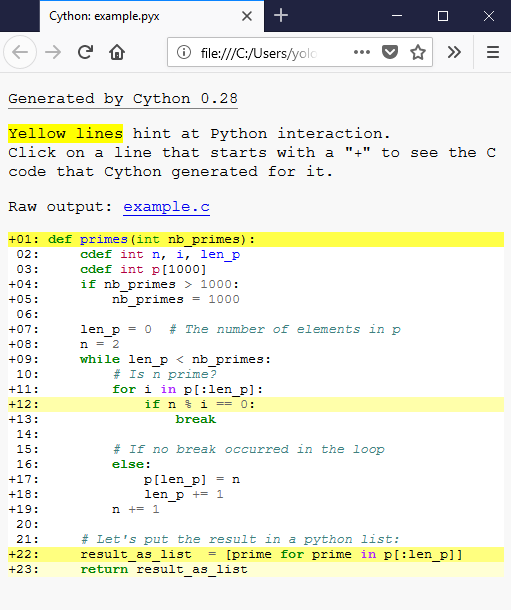
If a line is white, it means that the code generated doesn’t interact with Python, so will run as fast as normal C code. The darker the yellow, the more Python interaction there is in that line. Those yellow lines will usually operate on Python objects, raise exceptions, or do other kinds of higher-level operations than what can easily be translated into simple and fast C code. The function declaration and return use the Python interpreter so it makes sense for those lines to be yellow. Same for the list comprehension because it involves the creation of a Python object. But the line
									if


									n


									%


									i


									==


									0:
, why? We can examine the generated C code to understand:
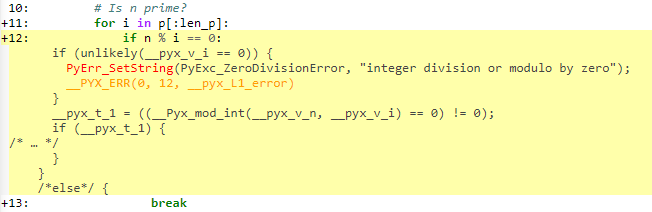
We can see that some checks happen. Because Cython defaults to the Python behavior, the language will perform division checks at runtime, just like Python does. You can deactivate those checks by using the 编译器指令 .
Now let’s see if, even if we have division checks, we obtained a boost in speed. Let’s write the same program, but Python-style:
def primes_python(nb_primes):
    p = []
    n = 2
    while len(p) < nb_primes:
        # Is n prime?
        for i in p:
            if n % i == 0:
                break
        # If no break occurred in the loop
        else:
            p.append(n)
        n += 1
    return p
It is also possible to take a plain
.py
file and to compile it with Cython. Let’s take
primes_python
, change the function name to
primes_python_compiled
and compile it with Cython (without changing the code). We will also change the name of the file to
example_py_cy.py
to differentiate it from the others. Now the
setup.py
看起来像这样:
from distutils.core import setup
from Cython.Build import cythonize
setup(
    ext_modules=cythonize(['example.pyx',        # Cython code file with primes() function
                           'example_py_cy.py'],  # Python code file with primes_python_compiled() function
                          annotate=True),        # enables generation of the html annotation file
)
Now we can ensure that those two programs output the same values:
>>> primes_python(1000) == primes(1000)
True
>>> primes_python_compiled(1000) == primes(1000)
True
It’s possible to compare the speed now:
python -m timeit -s 'from example_py import primes_python' 'primes_python(1000)'
10 loops, best of 3: 23 msec per loop
python -m timeit -s 'from example_py_cy import primes_python_compiled' 'primes_python_compiled(1000)'
100 loops, best of 3: 11.9 msec per loop
python -m timeit -s 'from example import primes' 'primes(1000)'
1000 loops, best of 3: 1.65 msec per loop
The cythonize version of
primes_python
is 2 times faster than the Python one, without changing a single line of code. The Cython version is 13 times faster than the Python version! What could explain this?
Usually the speedups are between 2x to 1000x. It depends on how much you call the Python interpreter. As always, remember to profile before adding types everywhere. Adding types makes your code less readable, so use them with moderation.
With Cython, it is also possible to take advantage of the C++ language, notably, part of the C++ standard library is directly importable from Cython code.
Let’s see what our
primes.pyx
becomes when using
vector
from the C++ standard library.
注意
Vector in C++ is a data structure which implements a list or stack based on a resizeable C array. It is similar to the Python
array
类型在
array
standard library module. There is a method
reserve
available which will avoid copies if you know in advance how many elements you are going to put in the vector. For more details see
this page from cppreference
.
# distutils: language=c++ from libcpp.vector cimport vector def primes(unsigned int nb_primes): cdef int n, i cdef vector[int] p p.reserve(nb_primes) # allocate memory for 'nb_primes' elements. n = 2 while p.size() < nb_primes: # size() for vectors is similar to len() for i in p: if n % i == 0: break else: p.push_back(n) # push_back is similar to append() n += 1 # Vectors are automatically converted to Python # lists when converted to Python objects. return p |
The first line is a compiler directive. It tells Cython to compile your code to C++. This will enable the use of C++ language features and the C++ standard library. Note that it isn’t possible to compile Cython code to C++ with
pyximport
. You should use a
setup.py
or a notebook to run this example.
You can see that the API of a vector is similar to the API of a Python list, and can sometimes be used as a drop-in replacement in Cython.
有关将 C++ 用于 Cython 的更多细节,见 在 Cython 中使用 C++ .
有关 Cython 语言的更多信息,见 语言基础 . To dive right in to using Cython in a numerical computation context, see 类型化内存视图 .

