
The following discussions cover details of PyInstaller internal methods. You should not need this level of detail for normal use, but such details are helpful if you want to investigate the PyInstaller code and possibly contribute to it, as described in 如何贡献 .
There are many steps that must take place before the bundled script can begin execution. A summary of these steps was given in the Overview ( 一文件夹式程序如何工作 and 一文件式程序如何工作 ). Here is more detail to help you understand what the bootloader does and how to figure out problems.
The bootloader prepares everything for running Python code. It begins the setup and then returns itself in another process. This approach of using two processes allows a lot of flexibility and is used in all bundles except one-folder mode in Windows. So do not be surprised if you will see your bundled app as two processes in your system task manager.
What happens during execution of bootloader:
第一步:启动引导程序。
									temppath


																/_MEI


									xxxxxx
.
									temppath


																/_MEI


									xxxxxx
.
第二步:引导程序本身作为子级进程启动。
运行 Python 代码需要几个步骤:
frozen
and
_MEIPASS
到
sys
built-in module.
./eggs
目录。
Installing means appending .egg file names to
sys.path
.
Python automatically detects whether an
item in
sys.path
is a zip file or a directory.
PyInstaller
embeds compiled python code (
.pyc
files) within the executable.
PyInstaller
injects its code into the normal Python import mechanism. Python allows this; the support is described in
PEP 302
“New Import Hooks”.
PyInstaller implements the PEP 302 specification for importing built-in modules, importing “frozen” modules (compiled python code bundled with the app) and for C-extensions. The code can be read in
./PyInstaller/loader/pyi_mod03_importers.py
.
At runtime the PyInstaller
PEP 302
hooks are appended to the variable
sys.meta_path
. When trying to import modules the interpreter will first try PEP 302 hooks in
sys.meta_path
before searching in
sys.path
. As a result, the Python interpreter loads imported python modules from the archive embedded in the bundled executable.
This is the resolution order of import statements in a bundled app:
sys.builtin_module_names
.
									package.subpackage.module


												.pyd
or
									package.subpackage.module


												.so
.
sys.path
.
There could be any additional location with python modules
or
.egg
filenames.
ImportError
.
PyInstaller
manages lists of files using the
TOC
(Table Of Contents) class. It provides the
Tree
class as a convenient way to build a
TOC
from a folder path.
对象的
TOC
class are used as input to the classes created in a spec file. For example, the
脚本
member of an Analysis object is a TOC containing a list of scripts. The
pure
member is a TOC with a list of modules, and so on.
Basically a
TOC
object contains a list of tuples of the form
(
name
,
path
,
typecode
)
In fact, it acts as an ordered set of tuples; that is, it contains no duplicates (where uniqueness is based on the name element of each tuple). Within this constraint, a TOC preserves the order of tuples added to it.
A TOC behaves like a list and supports the same methods such as appending, indexing, etc. A TOC also behaves like a set, and supports taking differences and intersections. In all of these operations a list of tuples can be used as one argument. For example, the following expressions are equivalent ways to add a file to the
a.datas
成员:
a.datas.append( [ ('README', 'src/README.txt', 'DATA' ) ] )
a.datas += [ ('README', 'src/README.txt', 'DATA' ) ]
Set-difference makes excluding modules quite easy. For example:
a.binaries - [('badmodule', None, None)]
is an expression that produces a new
TOC
that is a copy of
a.binaries
from which any tuple named
badmodule
has been removed. The right-hand argument to the subtraction operator is a list that contains one tuple in which
name
is
badmodule
和
path
and
typecode
elements are
None
. Because set membership is based on the
name
element of a tuple only, it is not necessary to give accurate
path
and
typecode
elements when subtracting.
In order to add files to a TOC, you need to know the typecode values and their related path values. A typecode is a one-word string. PyInstaller uses a number of typecode values internally, but for the normal case you need to know only these:
| typecode | description | 名称 | path |
|---|---|---|---|
| ‘DATA’ | Arbitrary files. | Run-time name. | Full path name in build. |
| ‘BINARY’ | A shared library. | Run-time name. | Full path name in build. |
| ‘EXTENSION’ | A binary extension to Python. | Run-time name. | Full path name in build. |
| ‘OPTION’ | A Python run-time option. | Option code | ignored. |
The run-time name of a file will be used in the final bundle. It may include path elements, for example
extras/mydata.txt
.
A
BINARY
file or an
EXTENSION
file is assumed to be loadable, executable code, for example a dynamic library. The types are treated the same.
EXTENSION
is generally used for a Python extension module, for example a module compiled by
Cython
.
PyInstaller
will examine either type of file for dependencies, and if any are found, they are also included.
The Tree class is a way of creating a TOC that describes some or all of the files within a directory:
Tree(
root
												,


												prefix=
run-time-folder
												,


												excludes=
string_list
												,


												typecode=
code
|
												'DATA'


												)
None
,
the tree files will be at
the top level of the run-time folder.
*.ext
, which causes files with this extension to be excluded
DATA
, which is appropriate for most cases.
例如:
extras_toc = Tree('../src/extras', prefix='extras', excludes=['tmp','*.pyc'])
This creates
extras_toc
as a TOC object that lists all files from the relative path
../src/extras
, omitting those that have the basename (or are in a folder named)
tmp
or that have the type
.pyc
. Each tuple in this TOC has:
												extras/


									filename
.
../src/extras
folder (relative to the location of the spec file).
DATA
(by default).
An example of creating a TOC listing some binary modules:
cython_mods = Tree( '..src/cy_mods', excludes=['*.pyx','*.py','*.pyc'], typecode='EXTENSION' )
This creates a TOC with a tuple for every file in the
cy_mods
folder, excluding any with the
.pyx
,
.py
or
.pyc
suffixes (so presumably collecting the
.pyd
or
.so
modules created by Cython). Each tuple in this TOC has:
../src/cy_mods
relative to the spec file.
EXTENSION
(
BINARY
could be used as well).
An archive is a file that contains other files, for example a
.tar
file, a
.jar
file, or a
.zip
file. Two kinds of archives are used in
PyInstaller
. One is a ZlibArchive, which allows Python modules to be stored efficiently and, with some import hooks, imported directly. The other, a CArchive, is similar to a
.zip
file, a general way of packing up (and optionally compressing) arbitrary blobs of data. It gets its name from the fact that it can be manipulated easily from C as well as from Python. Both of these derive from a common base class, making it fairly easy to create new kinds of archives.
A ZlibArchive contains compressed
.pyc
or
.pyo
files. The
PYZ
class invocation in a spec file creates a ZlibArchive.
The table of contents in a ZlibArchive is a Python dictionary that associates a key, which is a member’s name as given in an
import
statement, with a seek position and a length in the ZlibArchive. All parts of a ZlibArchive are stored in the
marshalled
format and so are platform-independent.
A ZlibArchive is used at run-time to import bundled python modules. Even with maximum compression this works faster than the normal import. Instead of searching
sys.path
, there’s a lookup in the dictionary. There are no directory operations and no file to open (the file is already open). There’s just a seek, a read and a decompress.
A Python error trace will point to the source file from which the archive entry was created (the
__file__
attribute from the time the
.pyc
was compiled, captured and saved in the archive). This will not tell your user anything useful, but if they send you a Python error trace, you can make sense of it.
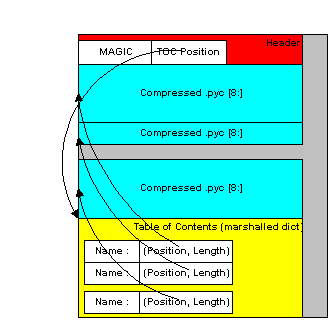
Structure of the ZlibArchive
A CArchive can contain any kind of file. It’s very much like a
.zip
file. They are easy to create in Python and easy to unpack from C code. A CArchive can be appended to another file, such as an ELF and COFF executable. To allow this, the archive is made with its table of contents at the end of the file, followed only by a cookie that tells where the table of contents starts and where the archive itself starts.
A CArchive can be embedded within another CArchive. An inner archive can be opened and used in place, without having to extract it.
Each table of contents entry has variable length. The first field in the entry gives the length of the entry. The last field is the name of the corresponding packed file. The name is null terminated. Compression is optional for each member.
There is also a type code associated with each member. The type codes are used by the self-extracting executables. If you’re using a
CArchive
作为
.zip
file, you don’t need to worry about the code.
The ELF executable format (Windows, GNU/Linux and some others) allows arbitrary data to be concatenated to the end of the executable without disturbing its functionality. For this reason, a CArchive’s Table of Contents is at the end of the archive. The executable can open itself as a binary file, seek to the end and ‘open’ the CArchive.
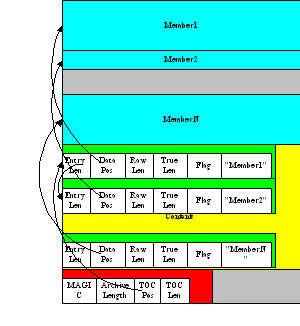
Structure of the CArchive
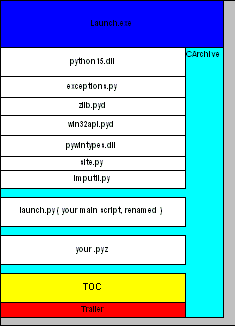
Structure of the Self Extracting Executable
使用
pyi-archive_viewer
command to inspect any type of archive:
pyi-archive_viewer
archivefile
With this command you can examine the contents of any archive built with
PyInstaller
(
PYZ
or
PKG
), or any executable (
.exe
file or an ELF or COFF binary). The archive can be navigated using these commands:
PYZ-00.pyz
archive inside it.
Go up one level (back to viewing the containing archive).
Quit.
pyi-archive_viewer
command has these options:
| -h , --help | Show help. |
| -l , --log | Quick contents log. |
| -b , --brief | Print a python evaluable list of contents filenames. |
| -r , --recursive | |
| Used with -l or -b, applies recursive behaviour. | |
You can inspect any executable file with
pyi-bindepend
:
pyi-bindepend
executable_or_dynamic_library
pyi-bindepend
command analyzes the executable or DLL you name and writes to stdout all its binary dependencies. This is handy to find out which DLLs are required by an executable or by another DLL.
pyi-bindepend
用于
PyInstaller
to follow the chain of dependencies of binary extensions during Analysis.
In certain cases it is important that when you build the same application twice, using exactly the same set of dependencies, the two bundles should be exactly, bit-for-bit identical.
That is not the case normally. Python uses a random hash to make dicts and other hashed types, and this affects compiled byte-code as well as PyInstaller internal data structures. As a result, two builds may not produce bit-for-bit identical results even when all the components of the application bundle are the same and the two applications execute in identical ways.
You can assure that a build will produce the same bits by setting the
PYTHONHASHSEED
environment variable to a known integer value before running
PyInstaller
. This forces Python to use the same random hash sequence until
PYTHONHASHSEED
is unset or set to
'random'
. For example, execute
PyInstaller
in a script such as the following (for GNU/Linux and OS X):
# set seed to a known repeatable integer value
PYTHONHASHSEED=1
export PYTHONHASHSEED
# create one-file build as myscript
pyinstaller myscript.spec
# make checksum
cksum dist/myscript/myscript | awk '{print $1}' > dist/myscript/checksum.txt
# let Python be unpredictable again
unset PYTHONHASHSEED
