OpenPyXL 3.0.7
  • 教程
  • 简单用法
  • 性能
  • 优化模式
  • 插入和删除行和列,移动单元格范围
  • 操纵 Pandas 和 NumPy
  • 图表
  • 注释
  • 操控样式
  • 额外工作表特性
  • 条件格式化
  • 数据透视表
  • 打印设置
  • 使用过滤器和排序
  • 验证单元格
  • 定义名称
  • 工作表表格
  • 剖析公式
  • 日期和时间
  • 保护
  • 开发
  • openpyxl 包
  • 3.0.7 (2021-03-09)
  • 3.0.6 (2021-01-14)
  • 3.0.5 (2020-08-21)
  • 3.0.4 (2020-06-24)
  • 3.0.3 (2020-01-20)
  • 3.0.2 (2019-11-25)
  • 3.0.1 (2019-11-14)
  • 3.0.0 (2019-09-25)
  • 2.6.4 (2019-09-25)
  • 2.6.3 (2019-08-19)
  • 2.6.2 (2019-03-29)
  • 2.6.1 (2019-03-04)
  • 2.6.0 (2019-02-06)
  • 2.6.-b1 (2019-01-08)
  • 2.6-a1 (2018-11-21)
  • 2.5.14 (2019-01-23)
  • 2.5.13 (brown bag)
  • 2.5.12 (2018-11-29)
  • 2.5.11 (2018-11-21)
  • 2.5.10 (2018-11-13)
  • 2.5.9 (2018-10-19)
  • 2.5.8 (2018-09-25)
  • 2.5.7 (2018-09-13)
  • 2.5.6 (2018-08-30)
  • 2.5.5 (2018-08-04)
  • 2.5.4 (2018-06-07)
  • 2.5.3 (2018-04-18)
  • 2.5.2 (2018-04-06)
  • 2.5.1 (2018-03-12)
  • 2.5.0 (2018-01-24)
  • 2.5.0-b2 (2018-01-19)
  • 2.5.0-b1 (2017-10-19)
  • 2.5.0-a3 (2017-08-14)
  • 2.5.0-a2 (2017-06-25)
  • 2.5.0-a1 (2017-05-30)
  • 2.4.11 (2018-01-24)
  • 2.4.10 (2018-01-19)
  • 2.4.9 (2017-10-19)
  • 2.4.8 (2017-05-30)
  • 2.4.7 (2017-04-24)
  • 2.4.6 (2017-04-14)
  • 2.4.5 (2017-03-07)
  • 2.4.4 (2017-02-23)
  • 2.4.3 (未发行)
  • 2.4.2 (2017-01-31)
  • 2.4.1 (2016-11-23)
  • 2.4.0 (2016-09-15)
  • 2.4.0-b1 (2016-06-08)
  • 2.4.0-a1 (2016-04-11)
  • 2.3.5 (2016-04-11)
  • 2.3.4 (2016-03-16)
  • 2.3.3 (2016-01-18)
  • 2.3.2 (2015-12-07)
  • 2.3.1 (2015-11-20)
  • 2.3.0 (2015-10-20)
  • 2.3.0-b2 (2015-09-04)
  • 2.3.0-b1 (2015-06-29)
  • 2.2.6 (未发行)
  • 2.2.5 (2015-06-29)
  • 2.2.4 (2015-06-17)
  • 2.2.3 (2015-05-26)
  • 2.2.2 (2015-04-28)
  • 2.2.1 (2015-03-31)
  • 2.2.0 (2015-03-11)
  • 2.2.0-b1 (2015-02-18)
  • 2.1.5 (2015-02-18)
  • 2.1.4 (2014-12-16)
  • 2.1.3 (2014-12-09)
  • 2.1.2 (2014-10-23)
  • 2.1.1 (2014-10-08)
  • 2.1.0 (2014-09-21)
  • 2.0.5 (2014-08-08)
  • 2.0.4 (2014-06-25)
  • 2.0.3 (2014-05-22)
  • 2.0.2 (2014-05-13)
  • 2.0.1 (2014-05-13) brown bag
  • 2.0.0 (2014-05-13) brown bag
  • 1.8.6 (2014-05-05)
  • 1.8.5 (2014-03-25)
  • 1.8.4 (2014-02-25)
  • 1.8.3 (2014-02-09)
  • 1.8.2 (2014-01-17)
  • 1.8.1 (2014-01-14)
  • 1.8.0 (2014-01-08)
  • 1.7.0 (2013-10-31)
  • Changing the layout of plot area and legend

    The layout of the chart within the canvas can be set by using the layout property of an instance of a layout class.

    图表布局

    Size and position

    The chart can be positioned within its container. x and y adjust position, w and h adjust the size . The units are proportions of the container. A chart cannot be positioned outside of its container and the width and height are the dominant constraints: if x + w > 1, then x = 1 - w.

    x is the horizontal position from the left y is the vertical position from the top h is the height of the chart relative to its container w is the width of the box

    模式

    In addition to the size and position, the mode for the relevant attribute can also be set to either factor or edge . Factor is the default:

    layout.xMode = edge
    				

    Target

    The layoutTarget can be set to outer or inner 。默认为 outer :

    layout.layoutTarget = inner
    				

    图例布局

    The position of the legend can be controlled either by setting its position: r , l , t , b ,和 tr , for right, left, top, bottom and top right respectively. The default is r .

    legend.position = 'tr'
    				

    or applying a manual layout:

    legend.layout = ManualLayout()
    				
    from openpyxl import Workbook, load_workbook
    from openpyxl.chart import ScatterChart, Series, Reference
    from openpyxl.chart.layout import Layout, ManualLayout
    wb = Workbook()
    ws = wb.active
    rows = [
        ['Size', 'Batch 1', 'Batch 2'],
        [2, 40, 30],
        [3, 40, 25],
        [4, 50, 30],
        [5, 30, 25],
        [6, 25, 35],
        [7, 20, 40],
    ]
    for row in rows:
        ws.append(row)
    ch1 = ScatterChart()
    xvalues = Reference(ws, min_col=1, min_row=2, max_row=7)
    for i in range(2, 4):
        values = Reference(ws, min_col=i, min_row=1, max_row=7)
        series = Series(values, xvalues, title_from_data=True)
        ch1.series.append(series)
    ch1.title = "Default layout"
    ch1.style = 13
    ch1.x_axis.title = 'Size'
    ch1.y_axis.title = 'Percentage'
    ch1.legend.position = 'r'
    ws.add_chart(ch1, "B10")
    from copy import deepcopy
    # Half-size chart, bottom right
    ch2 = deepcopy(ch1)
    ch2.title = "Manual chart layout"
    ch2.legend.position = "tr"
    ch2.layout=Layout(
        manualLayout=ManualLayout(
            x=0.25, y=0.25,
            h=0.5, w=0.5,
        )
    )
    ws.add_chart(ch2, "H10")
    # Half-size chart, centred
    ch3 = deepcopy(ch1)
    ch3.layout = Layout(
        ManualLayout(
        x=0.25, y=0.25,
        h=0.5, w=0.5,
        xMode="edge",
        yMode="edge",
        )
    )
    ch3.title = "Manual chart layout, edge mode"
    ws.add_chart(ch3, "B27")
    # Manually position the legend bottom left
    ch4 = deepcopy(ch1)
    ch4.title = "Manual legend layout"
    ch4.legend.layout = Layout(
        manualLayout=ManualLayout(
            yMode='edge',
            xMode='edge',
            x=0, y=0.9,
            h=0.1, w=0.5
        )
    )
    ws.add_chart(ch4, "H27")
    wb.save("chart_layout.xlsx")
    				

    This produces four charts illustrating various possibilities:
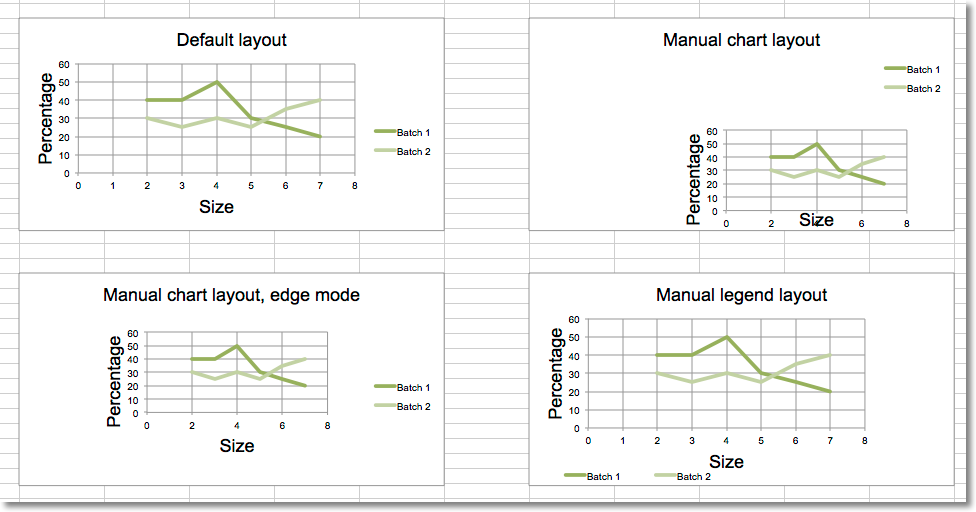
    "Different chart and legend layouts"
