OpenPyXL 3.0.7
  • 教程
  • 简单用法
  • 性能
  • 优化模式
  • 插入和删除行和列,移动单元格范围
  • 操纵 Pandas 和 NumPy
  • 图表
  • 注释
  • 操控样式
  • 额外工作表特性
  • 条件格式化
  • 数据透视表
  • 打印设置
  • 使用过滤器和排序
  • 验证单元格
  • 定义名称
  • 工作表表格
  • 剖析公式
  • 日期和时间
  • 保护
  • 开发
  • openpyxl 包
  • 3.0.7 (2021-03-09)
  • 3.0.6 (2021-01-14)
  • 3.0.5 (2020-08-21)
  • 3.0.4 (2020-06-24)
  • 3.0.3 (2020-01-20)
  • 3.0.2 (2019-11-25)
  • 3.0.1 (2019-11-14)
  • 3.0.0 (2019-09-25)
  • 2.6.4 (2019-09-25)
  • 2.6.3 (2019-08-19)
  • 2.6.2 (2019-03-29)
  • 2.6.1 (2019-03-04)
  • 2.6.0 (2019-02-06)
  • 2.6.-b1 (2019-01-08)
  • 2.6-a1 (2018-11-21)
  • 2.5.14 (2019-01-23)
  • 2.5.13 (brown bag)
  • 2.5.12 (2018-11-29)
  • 2.5.11 (2018-11-21)
  • 2.5.10 (2018-11-13)
  • 2.5.9 (2018-10-19)
  • 2.5.8 (2018-09-25)
  • 2.5.7 (2018-09-13)
  • 2.5.6 (2018-08-30)
  • 2.5.5 (2018-08-04)
  • 2.5.4 (2018-06-07)
  • 2.5.3 (2018-04-18)
  • 2.5.2 (2018-04-06)
  • 2.5.1 (2018-03-12)
  • 2.5.0 (2018-01-24)
  • 2.5.0-b2 (2018-01-19)
  • 2.5.0-b1 (2017-10-19)
  • 2.5.0-a3 (2017-08-14)
  • 2.5.0-a2 (2017-06-25)
  • 2.5.0-a1 (2017-05-30)
  • 2.4.11 (2018-01-24)
  • 2.4.10 (2018-01-19)
  • 2.4.9 (2017-10-19)
  • 2.4.8 (2017-05-30)
  • 2.4.7 (2017-04-24)
  • 2.4.6 (2017-04-14)
  • 2.4.5 (2017-03-07)
  • 2.4.4 (2017-02-23)
  • 2.4.3 (未发行)
  • 2.4.2 (2017-01-31)
  • 2.4.1 (2016-11-23)
  • 2.4.0 (2016-09-15)
  • 2.4.0-b1 (2016-06-08)
  • 2.4.0-a1 (2016-04-11)
  • 2.3.5 (2016-04-11)
  • 2.3.4 (2016-03-16)
  • 2.3.3 (2016-01-18)
  • 2.3.2 (2015-12-07)
  • 2.3.1 (2015-11-20)
  • 2.3.0 (2015-10-20)
  • 2.3.0-b2 (2015-09-04)
  • 2.3.0-b1 (2015-06-29)
  • 2.2.6 (未发行)
  • 2.2.5 (2015-06-29)
  • 2.2.4 (2015-06-17)
  • 2.2.3 (2015-05-26)
  • 2.2.2 (2015-04-28)
  • 2.2.1 (2015-03-31)
  • 2.2.0 (2015-03-11)
  • 2.2.0-b1 (2015-02-18)
  • 2.1.5 (2015-02-18)
  • 2.1.4 (2014-12-16)
  • 2.1.3 (2014-12-09)
  • 2.1.2 (2014-10-23)
  • 2.1.1 (2014-10-08)
  • 2.1.0 (2014-09-21)
  • 2.0.5 (2014-08-08)
  • 2.0.4 (2014-06-25)
  • 2.0.3 (2014-05-22)
  • 2.0.2 (2014-05-13)
  • 2.0.1 (2014-05-13) brown bag
  • 2.0.0 (2014-05-13) brown bag
  • 1.8.6 (2014-05-05)
  • 1.8.5 (2014-03-25)
  • 1.8.4 (2014-02-25)
  • 1.8.3 (2014-02-09)
  • 1.8.2 (2014-01-17)
  • 1.8.1 (2014-01-14)
  • 1.8.0 (2014-01-08)
  • 1.7.0 (2013-10-31)
  • 区域图表

    2D 区域图表

    Area charts are similar to line charts with the addition that the area underneath the plotted line is filled. Different variants are available by setting the grouping to “standard”, “stacked” or “percentStacked”; “standard” is the default.

    from openpyxl import Workbook
    from openpyxl.chart import (
        AreaChart,
        Reference,
        Series,
    )
    wb = Workbook()
    ws = wb.active
    rows = [
        ['Number', 'Batch 1', 'Batch 2'],
        [2, 40, 30],
        [3, 40, 25],
        [4, 50, 30],
        [5, 30, 10],
        [6, 25, 5],
        [7, 50, 10],
    ]
    for row in rows:
        ws.append(row)
    chart = AreaChart()
    chart.title = "Area Chart"
    chart.style = 13
    chart.x_axis.title = 'Test'
    chart.y_axis.title = 'Percentage'
    cats = Reference(ws, min_col=1, min_row=1, max_row=7)
    data = Reference(ws, min_col=2, min_row=1, max_col=3, max_row=7)
    chart.add_data(data, titles_from_data=True)
    chart.set_categories(cats)
    ws.add_chart(chart, "A10")
    wb.save("area.xlsx")
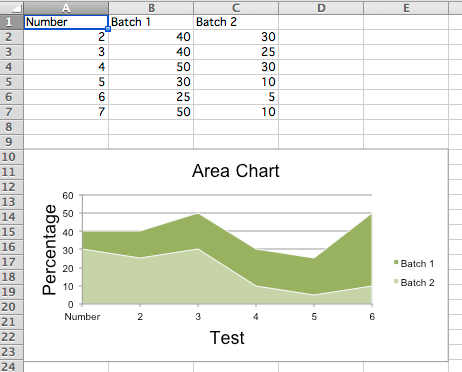
    					
    "Sample area charts"

    3D 区域图表

    You can also create 3D area charts

    from openpyxl import Workbook
    from openpyxl.chart import (
        AreaChart3D,
        Reference,
        Series,
    )
    wb = Workbook()
    ws = wb.active
    rows = [
        ['Number', 'Batch 1', 'Batch 2'],
        [2, 30, 40],
        [3, 25, 40],
        [4 ,30, 50],
        [5 ,10, 30],
        [6,  5, 25],
        [7 ,10, 50],
    ]
    for row in rows:
        ws.append(row)
    chart = AreaChart3D()
    chart.title = "Area Chart"
    chart.style = 13
    chart.x_axis.title = 'Test'
    chart.y_axis.title = 'Percentage'
    chart.legend = None
    cats = Reference(ws, min_col=1, min_row=1, max_row=7)
    data = Reference(ws, min_col=2, min_row=1, max_col=3, max_row=7)
    chart.add_data(data, titles_from_data=True)
    chart.set_categories(cats)
    ws.add_chart(chart, "A10")
    wb.save("area3D.xlsx")
    					

    This produces a simple 3D area chart where the third axis can be used to replace the legend:
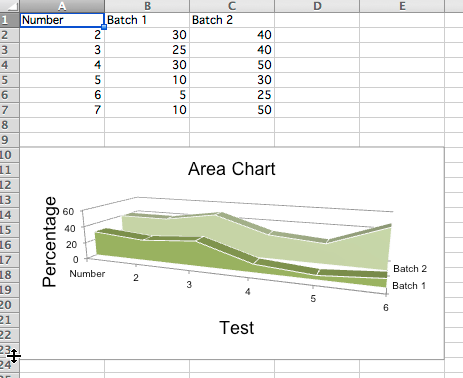
    "Sample 3D area chart with a series axis"
